Filesystem Layout: Where Containers Live
Written by:
Igor Gorovyy
DevOps Engineer Lead & Senior Solutions Architect
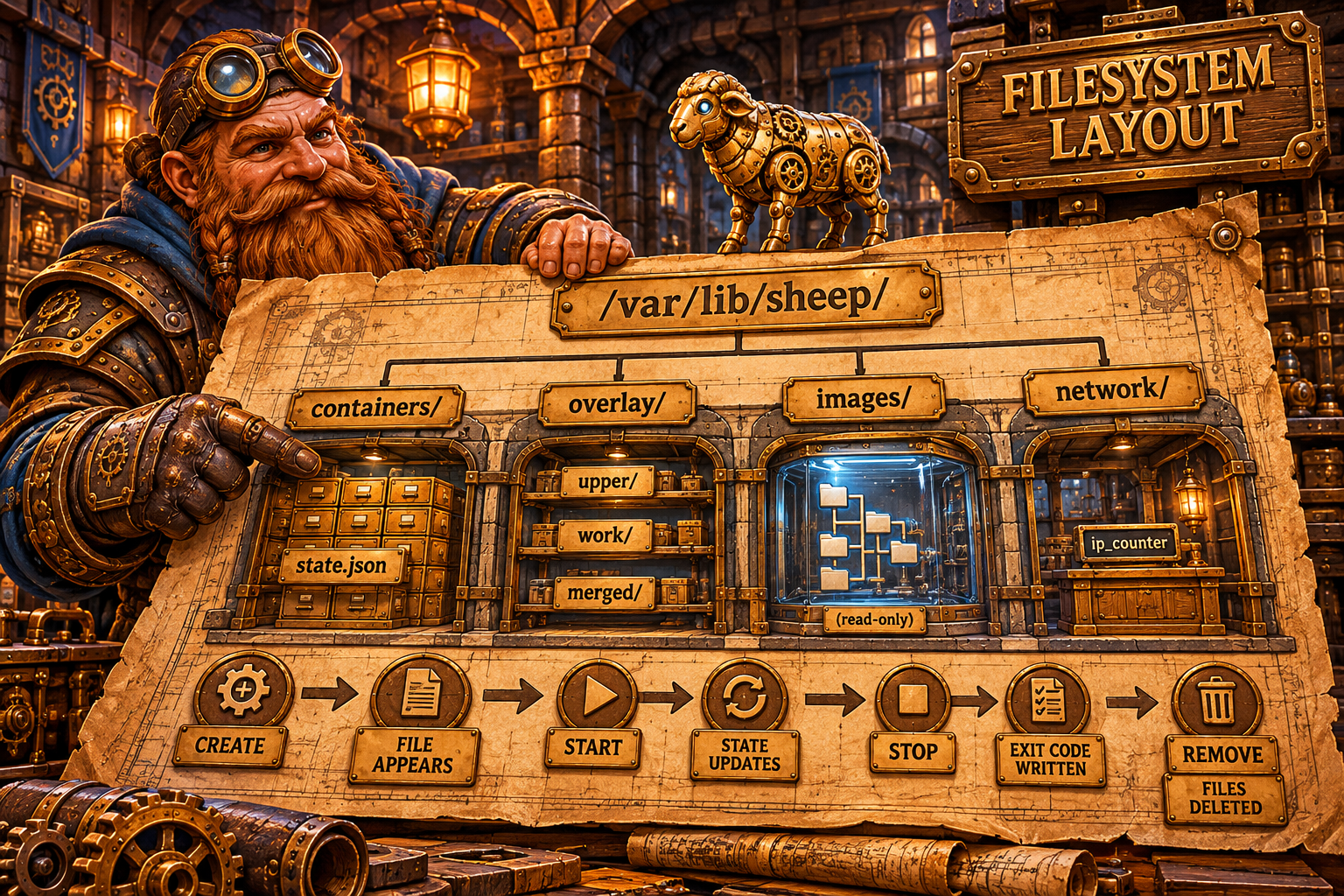
Everything in Sheep is files. Container state, images, overlay layers, the IP counter. No database, no daemon with in-memory state. Restart Sheep and it reads the files and knows everything that happened before the restart.
Full Structure
/var/lib/sheep/
├── containers/
│   ├── a1b2c3d4e5f6.../
│   │   └── state.json          # container state
│   └── f6e5d4c3b2a1.../
│       └── state.json
├── overlay/
│   ├── a1b2c3d4e5f6.../
│   │   ├── upper/              # container changes
│   │   ├── work/               # OverlayFS working directory
│   │   └── merged/             # what the container sees
│   └── f6e5d4c3b2a1.../
│       ├── upper/
│       ├── work/
│       └── merged/
├── images/
│   ├── abc123.../
│   │   ├── manifest.json       # image metadata
│   │   └── rootfs/             # filesystem
│   │       ├── bin/
│   │       ├── etc/
│   │       ├── usr/
│   │       └── var/
│   └── def456.../
│       ├── manifest.json
│       └── rootfs/
└── network/
    └── ip_counter              # last allocated IP
File Lifecycle
sequenceDiagram
    participant FS as Filesystem

    Note over FS: sheep create --name web nginx
    FS->>FS: mkdir containers/a1b2c3.../
    FS->>FS: write containers/a1b2c3.../state.json (state: created)
    FS->>FS: mkdir overlay/a1b2c3.../{upper,work,merged}
    FS->>FS: mount overlay (lower=images/abc/rootfs)

    Note over FS: sheep start web
    FS->>FS: write containers/a1b2c3.../state.json (state: running, pid: 12345)

    Note over FS: sheep stop web
    FS->>FS: write containers/a1b2c3.../state.json (state: stopped, exit_code: 0)

    Note over FS: sheep rm web
    FS->>FS: umount overlay/a1b2c3.../merged
    FS->>FS: rm -rf overlay/a1b2c3.../
    FS->>FS: rm -rf containers/a1b2c3.../
containers/ - State of Each Container
state.json contains everything about the container: ID, name, image, command, state, PID, configuration, network settings, mount points.
Initialization code:
const (
    BaseDir       = "/var/lib/sheep"
    ContainersDir = "/var/lib/sheep/containers"
    OverlayDir    = "/var/lib/sheep/overlay"
)

func (m *Manager) Init() error {
    dirs := []string{
        filepath.Join(m.baseDir, "containers"),
        filepath.Join(m.baseDir, "overlay"),
        filepath.Join(m.baseDir, "images"),
        filepath.Join(m.baseDir, "network"),
    }
    for _, d := range dirs {
        os.MkdirAll(d, 0755)
    }
    return m.loadExisting()
}
Four directories created on first run. loadExisting() scans containers/ and loads every state.json.
overlay/ - Copy-on-Write Filesystem
Three directories per container:
- upper/ - files the container created or modified. Empty on start. If the container writes
/var/log/app.log, it appears here. - work/ - internal OverlayFS directory for atomic operations. Never touch this manually.
- merged/ - the union view. The container sees this directory as its
/. OverlayFS automatically shows files from upper (if present) or from lower (images/xxx/rootfs).
func (m *Manager) setupOverlay(id, lowerDir string) (string, error) {
    overlayBase := filepath.Join(m.baseDir, "overlay", id)
    upper := filepath.Join(overlayBase, "upper")
    work := filepath.Join(overlayBase, "work")
    merged := filepath.Join(overlayBase, "merged")

    for _, d := range []string{upper, work, merged} {
        os.MkdirAll(d, 0755)
    }

    if err := mountOverlay(lowerDir, upper, work, merged); err != nil {
        return copyRootFS(lowerDir, merged)
    }
    return merged, nil
}
images/ - Read-only Layers
Each image is a separate directory with manifest.json and rootfs/:
{
  "id": "abc123def456...",
  "name": "nginx",
  "tag": "latest",
  "size": 188743680,
  "created_at": "2026-04-28T09:00:00Z",
  "rootfs": "/var/lib/sheep/images/abc123.../rootfs"
}
rootfs/ is the lower layer for overlay. Never modified. 10 containers from nginx share one rootfs. Each has its own upper layer.
graph TB
    IMG["images/abc/rootfs/<br/>(read-only, shared)"]
    IMG --> C1_M["overlay/container1/merged/"]
    IMG --> C2_M["overlay/container2/merged/"]
    IMG --> C3_M["overlay/container3/merged/"]

    C1_U["overlay/container1/upper/<br/>(container1 changes)"] --> C1_M
    C2_U["overlay/container2/upper/<br/>(container2 changes)"] --> C2_M
    C3_U["overlay/container3/upper/<br/>(container3 changes)"] --> C3_M
network/ - One File
// ip_counter: "42"
func LoadIPCounter(baseDir string) {
    data, _ := os.ReadFile(
        filepath.Join(baseDir, "network", "ip_counter"))
    val := strings.TrimSpace(string(data))
    if n, err := strconv.ParseUint(val, 10, 32); err == nil {
        atomic.StoreUint32(&ipCounter, uint32(n))
    }
}

func SaveIPCounter(baseDir string) {
    os.WriteFile(
        filepath.Join(baseDir, "network", "ip_counter"),
        []byte(strconv.FormatUint(
            uint64(atomic.LoadUint32(&ipCounter)), 10)),
        0644)
}
The IP address counter is persisted to disk so that after a restart we don't hand out the same IPs.
Shepherd - One File
/var/lib/shepherd/
└── shepherd.db          # BoltDB, ~100KB-10MB
The entire cluster state: pods, services, deployments, nodes, events. One file you can copy for backup.
store, _ := shepherd.NewStore(dataDir + "/shepherd.db")
Comparison with Docker
Docker:
/var/lib/docker/
├── containers/          # container metadata + logs
├── image/               # image metadata database
├── overlay2/            # overlayfs layers
│   ├── <layer-id>/
│   │   ├── diff/        # layer content
│   │   ├── link         # short name
│   │   └── lower        # parent layers
│   └── l/               # short name symlinks
├── network/             # network state
├── volumes/             # named volumes
└── buildkit/            # build cache

Sheep:
/var/lib/sheep/
├── containers/          # state.json per container
├── overlay/             # upper/work/merged per container
├── images/              # manifest.json + rootfs per image
└── network/             # ip_counter
Docker is more complex because it handles image layers (each layer separately), link files for efficient mounting, and a content-addressable store. Sheep stores the full rootfs per image - simpler, but without layer deduplication.
What's Not Ideal Here
state.json isn't atomic. If Sheep crashes mid-write, the file can be corrupted. Docker uses atomic writes (temp file + rename) for state persistence. In Sheep, os.WriteFile doesn't guarantee atomicity.
A couple more gotchas:
- Orphaned overlay mounts. If Sheep crashes before
umount merged, the mount stays in the kernel. A laterrm -rfof the directory "succeeds," but the mount lingers in/proc/mounts, keeping the lower busy. - Full rootfs per image is expensive on disk. Ten different images based on one Ubuntu means ten copies of the base layer. Without a content-addressable store there's no deduplication, and
du -sh images/grows fast.
💡 Fun facts
- OverlayFS requires
upperandworkto live on the same filesystem - which is exactly why Sheep keeps them side by side in one container directory.work/must be empty at mount time, or the kernel returnsEBUSY. - Docker's
l/directory of short symlinks isn't an accident: themountcommand has a limit on argument length (roughly one page of memory), and a chain of dozens of layer paths blows right past it. Short names are a workaround for that kernel limit. - The
/var/libpath is chosen deliberately: per the Filesystem Hierarchy Standard, that's where variable state lives that must survive reboots (unlike/var/runor/tmp). Docker, containerd, Sheep - all follow this convention. - Using
state.jsonas the single source of truth is the same approach as the OCI runtime spec: runc also keeps astate.jsonper container, and that's exactly whatrunc statereads.
What I figured out while digging into this
The most useful realization: "no database" isn't a simplification, it's an architectural choice. When all state is files in a predictable tree, debugging becomes trivial: cat state.json, ls overlay/, and you see everything the runtime sees. No hidden in-memory state that vanished after a crash.
But that same simplicity bites you on atomicity. I was used to thinking "write a file" is safe. It turned out that without temp+rename, one failed write mid-crash leaves a container unloadable. SQLite or BoltDB give you that for free - and now I understand why real runtimes lean on them.
What could be improved
- Atomic state writes: write to
state.json.tmp, thenos.Rename- on most filesystems rename is atomic, and it removes a whole class of corruption bugs. - Content-addressable layers instead of a full rootfs per image: store each layer by its content hash and share it across images - the way Docker/containerd do.
- GC for orphaned overlays: on startup, reconcile
overlay/against the list of containers and unmount/remove anything that no longer has astate.json. - Lazy-mount
mergedonly whilerunningrather than keeping the overlay mounted forstoppedcontainers - saving mounts and file descriptors.
Try It Yourself
# Full tree:
find /var/lib/sheep -maxdepth 3 -type d
# Size by directory:
du -sh /var/lib/sheep/*/
# Shepherd state:
ls -lh /var/lib/shepherd/
Next up - State Machines: why explicit states prevent an entire class of bugs.
Resources
- Filesystem Hierarchy Standard: Linux FHS overview
- Docker storage drivers: how Docker lays out /var/lib/docker
Source code for the series: github.com/igorgorovoy/sheep-shepherd-meadow
Previous: Kubernetes vs Shepherd