Label Selectors: Linking Resources Without Foreign Keys
Written by:
Igor Gorovyy
DevOps Engineer Lead & Senior Solutions Architect
In SQL you link tables through foreign keys. In Kubernetes the link between resources is through labels. A Deployment doesn't have a "my pods" field. It has a selector: "all pods with labels app=web." A Service doesn't know about specific pods. It knows a selector. This is a fundamental design decision that shapes the entire architecture.
Labels are just a map
type ObjectMeta struct {
    Name      string            `json:"name"`
    Namespace string            `json:"namespace"`
    UID       string            `json:"uid"`
    Labels    map[string]string `json:"labels,omitempty"`
    CreatedAt time.Time         `json:"created_at"`
}
Labels are a map[string]string. Key and value are arbitrary strings. No schema, no validation. Convention is by agreement: app=web, tier=frontend, version=v2.
matchLabels: 8 lines that connect everything
func matchLabels(nodeLabels, selector map[string]string) bool {
    if len(selector) == 0 {
        return true // empty selector matches anything
    }
    for k, v := range selector {
        if nodeLabels[k] != v {
            return false
        }
    }
    return true
}
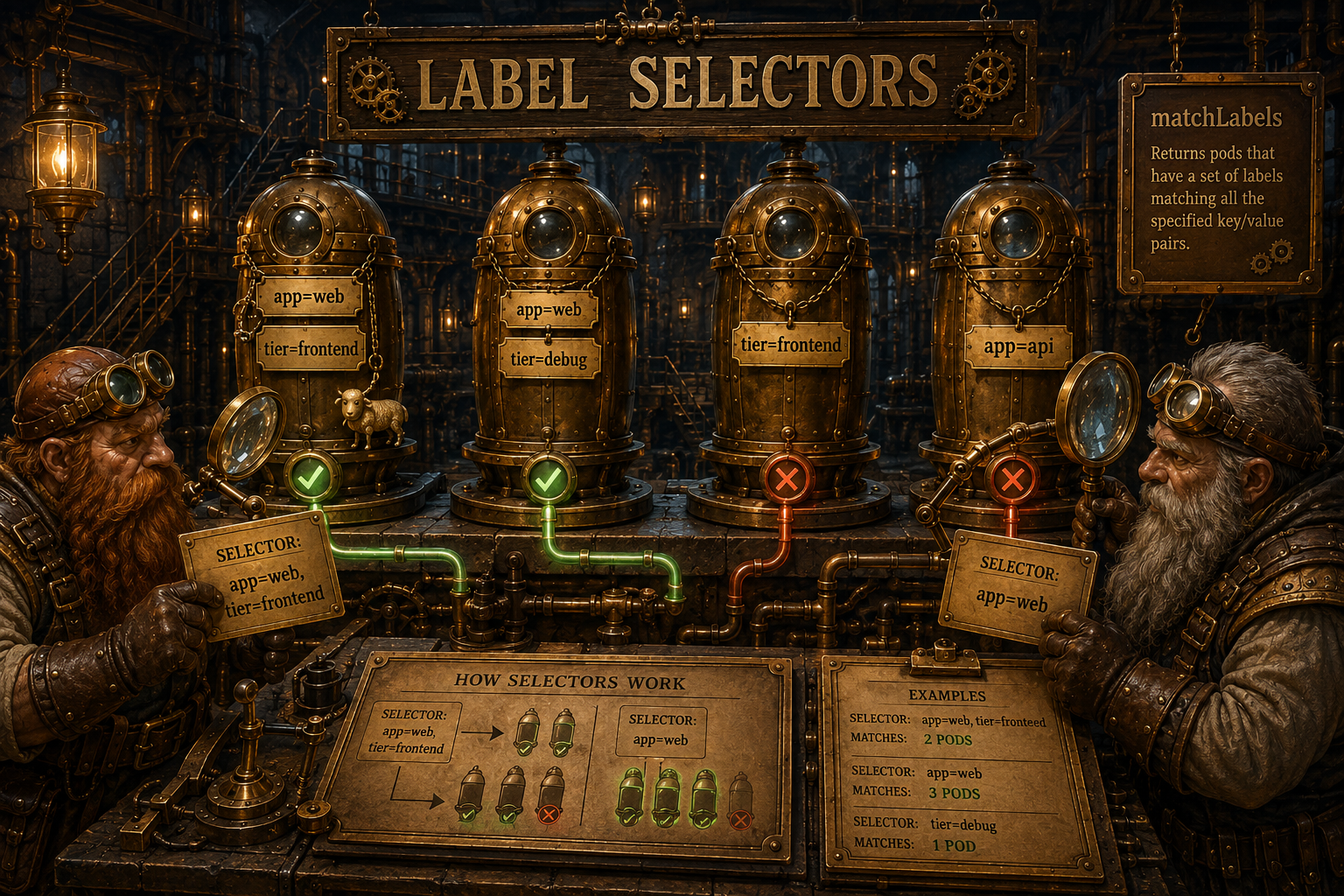
The logic is simple: every key in the selector must be present in the resource's labels with the same value. It's AND logic: app=web AND tier=frontend means both must match.
Who is linked to whom
graph TB
    DEP["Deployment: web<br/>selector: app=web, tier=frontend"]
    SVC["Service: web-svc<br/>selector: app=web"]

    P1["Pod: web-0<br/>labels: app=web, tier=frontend"]
    P2["Pod: web-1<br/>labels: app=web, tier=frontend"]
    P3["Pod: debug-pod<br/>labels: app=web, tier=debug"]
    P4["Pod: api-0<br/>labels: app=api"]

    DEP -->|"match<br/>(app=web AND tier=frontend)"| P1
    DEP -->|"match"| P2
    DEP -.->|"no match<br/>(tier != frontend)"| P3

    SVC -->|"match (app=web)"| P1
    SVC -->|"match"| P2
    SVC -->|"match"| P3
    SVC -.->|"no match"| P4
Notice: the Service with selector app=web picks up three pods (web-0, web-1, and debug-pod), while the Deployment with selector app=web, tier=frontend picks up only two (web-0 and web-1). Different number of keys = different selection.
Three types of links through labels
Deployment -> Pods
The ReplicationController finds a Deployment's pods through the selector:
func (rc *ReplicationController) reconcileDeployment(
    dep *Deployment) {
    allPods, _ := rc.store.ListPods(dep.Metadata.Namespace)

    var matchingPods []*Pod
    for _, pod := range allPods {
        if matchLabels(pod.Metadata.Labels, dep.Spec.Selector) {
            matchingPods = append(matchingPods, pod)
        }
    }

    current := len(matchingPods)
    desired := dep.Spec.Replicas
    // scale up or down...
}
The Deployment doesn't store a list of pods. Every reconcile, it searches for them from scratch.
Service -> Pods
The ServiceController builds endpoints from Running pods that match:
func (sc *ServiceController) reconcileService(svc *Service) {
    pods, _ := sc.store.ListPods(svc.Metadata.Namespace)

    var endpoints []string
    for _, pod := range pods {
        if matchLabels(pod.Metadata.Labels, svc.Spec.Selector) &&
            pod.Status.Phase == PodRunning &&
            pod.Status.PodIP != "" {
            for _, port := range svc.Spec.Ports {
                endpoints = append(endpoints,
                    fmt.Sprintf("%s:%d",
                        pod.Status.PodIP, port.TargetPort))
            }
        }
    }
    svc.Status.Endpoints = endpoints
    sc.store.UpdateService(svc)
}
Three conditions: labels match, pod is Running, has an IP. If a pod goes down, it automatically disappears from endpoints on the next reconcile.
Pod -> Node (nodeSelector)
The Scheduler checks whether node labels match the pod's nodeSelector:
func (s *Scheduler) filterNodes(nodes []*Node,
    pod *Pod) []*Node {
    var feasible []*Node
    for _, node := range nodes {
        // ...
        if !matchLabels(node.Metadata.Labels,
            pod.Spec.NodeSelector) {
            continue
        }
        feasible = append(feasible, node)
    }
    return feasible
}
A pod with nodeSelector: {gpu: "true"} will only land on a node with the label gpu=true.
How labels get onto a pod
When the ReplicationController creates a pod for a Deployment, it copies labels from the template and adds labels from the selector:
func (rc *ReplicationController) createPodForDeployment(
    dep *Deployment, index int) {
    pod := &Pod{
        Metadata: ObjectMeta{
            Name: fmt.Sprintf("%s-%d", dep.Metadata.Name, index),
            Labels: mergeLabels(
                dep.Spec.Template.Metadata.Labels,
                dep.Spec.Selector),
        },
        Spec: dep.Spec.Template.Spec,
    }
    rc.store.CreatePod(pod)
}

func mergeLabels(sets ...map[string]string) map[string]string {
    result := make(map[string]string)
    for _, s := range sets {
        for k, v := range s { result[k] = v }
    }
    return result
}
Why not foreign keys
| Foreign keys | Labels | |
|---|---|---|
| Creating a pod | Update Deployment.pods[] | Nothing, labels are already there |
| Recreating a pod (new UID) | Update the foreign key | Labels stay the same, link preserved |
| Deleting a Deployment | CASCADE DELETE pods | Controller deletes during reconcile |
| Dynamic addition | INSERT into junction table | Add a label to the pod |
| Query | JOIN + WHERE | Linear scan + matchLabels |
Labels are simpler for dynamic systems where resources are constantly created and deleted.
A nuance
Label matching is a full scan. Every reconcile, the controller iterates over all pods in the namespace and checks each one's labels. For 10 pods this is instant. For 10,000 - noticeable.
In Kubernetes this is solved through informers and caches: at startup, the controller loads all pods into memory, then receives only changes through the Watch API. In Shepherd, we read all pods from BoltDB every 5 seconds. For a learning project - that's fine.
Second point - there's no label validation. Nothing stops you from putting app=web on a pod that has nothing to do with the web deployment. In Kubernetes, Admission Webhooks can enforce this.
Third - selectors can overlap. If two Deployments both have selector app=web, both will "adopt" the same pods and start fighting over the replica count. Our matchLabels never notices this. In Kubernetes, a Deployment has a selector plus a unique pod-template-hash on the ReplicaSet to prevent exactly that.
Fun facts
- In "real" Kubernetes, selectors come in two flavors: equality-based (
app=web) and set-based (tier in (frontend, cache),env != prod). OurmatchLabelsimplements only the first, simplest one. - A label key in Kubernetes may have an optional domain prefix (
example.com/team), and the value is limited to 63 characters and must follow a DNS-like format. "Arbitrary string" is a simplification that only works in a learning project. - Labels and annotations look identical (both
map[string]string), but their purpose differs: labels are searchable and selectable, annotations are just a metadata store - you can't select on them. - The same selector mechanism underpins almost everything: Services, NetworkPolicies, PodAffinity, even
kubectl get pods -l app=web. One primitive, dozens of uses.
What I figured out while digging into this
While writing those eight lines of matchLabels, it clicked why Kubernetes deliberately rejected foreign keys. Not because labels are "more elegant", but because a pod in this system is ephemeral. It's born and dies dozens of times a day, each time with a new UID. Any reference by ID would go stale instantly. Labels survive recreation: a new pod with the same labels is automatically "ours" again. Loose coupling here isn't a style choice - it's the only way to link things that keep disappearing.
What could be improved
- Add set-based operations (
in,notin,exists) - that turns flat labels into a real query language. - Build an inverted index
label -> []podUIDinstead of the linear scan. Then a selector lookup becomes O(matches) rather than O(all pods). - Add a selector-overlap check on Deployment/Service creation and reject conflicting ones, so two controllers don't fight over the same pods.
- Add validation of key and value format (length, allowed characters), the way Kubernetes does, to catch mistakes before they hit the store.
Try it yourself
# Check pod labels:
sheepctl describe pod web-0 | grep -A5 labels
# Create a service with the same selector:
sheepctl apply -f - <<'EOF'
{"kind":"Service","metadata":{"name":"test-svc"},"spec":{"selector":{"app":"web"},"ports":[{"port":80,"target_port":8080}]}}
EOF
sheepctl get services  # you'll see endpoints from Running pods
Next up - why a pod always starts as Pending and what that gives you for reliability.
Resources
- Labels and Selectors: semantics and syntax
- Well-known labels, annotations and taints: standard keys
Source code for the series: github.com/igorgorovoy/sheep-shepherd-meadow
Previous: Desired vs Actual State | Next: Async Scheduling