Service Discovery: How a Service Finds Its Pods
Written by:
Igor Gorovyy
DevOps Engineer Lead & Senior Solutions Architect
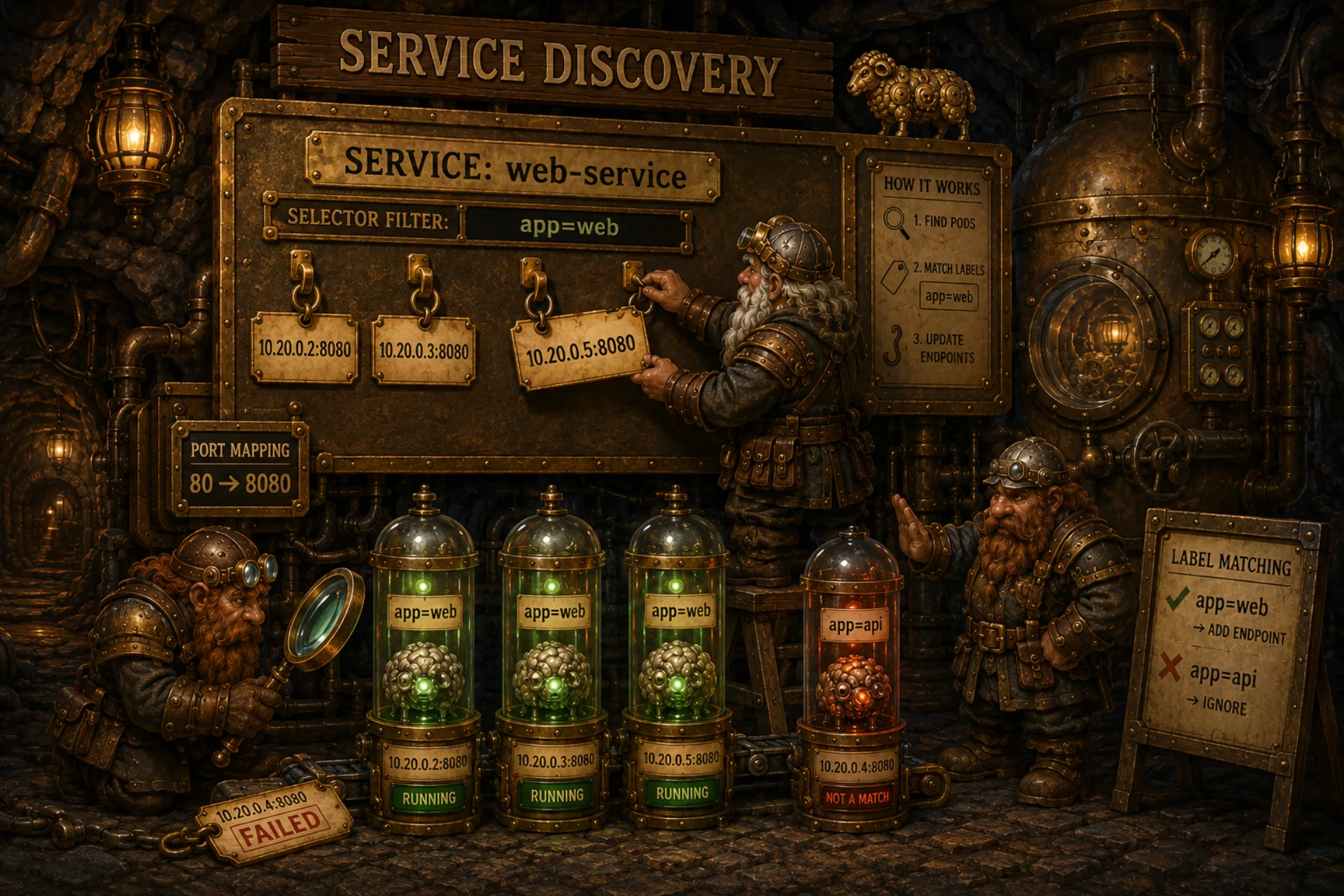
Pods come and go. Their IP addresses change on recreation. If pod web-0 had IP 10.20.0.2 and got 10.20.0.5 after a restart, clients need to find out the new address somehow. Service solves this: a stable entry point that always knows where the right pods are.
How It Works
A Service doesn't proxy traffic. It stores a list of endpoints - IP:port addresses of pods that match the selector. The ServiceController updates this list every 5 seconds.
graph TB
    SVC["Service: web-service<br/>selector: app=web<br/>ports: 80 → 8080"]

    P1["web-0<br/>labels: app=web<br/>IP: 10.20.0.2<br/>Phase: Running"]
    P2["web-1<br/>labels: app=web<br/>IP: 10.20.0.3<br/>Phase: Running"]
    P3["web-2<br/>labels: app=web<br/>IP: 10.20.0.4<br/>Phase: Failed"]
    P4["api-0<br/>labels: app=api<br/>IP: 10.20.0.5<br/>Phase: Running"]

    SVC -->|"labels match + Running + has IP"| P1
    SVC -->|"labels match + Running + has IP"| P2
    SVC -.->|"labels match, NOT Running"| P3
    SVC -.->|"labels DON'T match"| P4

    EP["Endpoints:<br/>10.20.0.2:8080<br/>10.20.0.3:8080"]
    P1 --> EP
    P2 --> EP
Service Type
type Service struct {
    Kind     string        `json:"kind"`
    Metadata ObjectMeta    `json:"metadata"`
    Spec     ServiceSpec   `json:"spec"`
    Status   ServiceStatus `json:"status"`
}

type ServiceSpec struct {
    Selector map[string]string `json:"selector"`
    Ports    []ServicePort     `json:"ports"`
    Type     ServiceType       `json:"type"`
}

type ServicePort struct {
    Name       string `json:"name,omitempty"`
    Port       int    `json:"port"`        // external port
    TargetPort int    `json:"target_port"` // pod port
    NodePort   int    `json:"node_port,omitempty"`
    Protocol   string `json:"protocol,omitempty"`
}

type ServiceStatus struct {
    ClusterIP string   `json:"cluster_ip,omitempty"`
    Endpoints []string `json:"endpoints,omitempty"`
}
Port is how clients see the service. TargetPort is the actual container port. A Service with port 80 -> target_port 8080 lets pods listen on 8080 while clients connect on 80.
ServiceController
type ServiceController struct {
    store  *Store
    logger *log.Logger
}

func (sc *ServiceController) Run(stopCh <-chan struct{}) {
    ticker := time.NewTicker(5 * time.Second)
    defer ticker.Stop()

    sc.logger.Println("service controller started")

    for {
        select {
        case <-stopCh:
            sc.logger.Println("service controller stopped")
            return
        case <-ticker.C:
            sc.reconcile()
        }
    }
}

func (sc *ServiceController) reconcile() {
    services, err := sc.store.ListServices("")
    if err != nil { return }

    for _, svc := range services {
        sc.reconcileService(svc)
    }
}

func (sc *ServiceController) reconcileService(svc *Service) {
    pods, err := sc.store.ListPods(svc.Metadata.Namespace)
    if err != nil { return }

    var endpoints []string
    for _, pod := range pods {
        if matchLabels(pod.Metadata.Labels,
            svc.Spec.Selector) &&
            pod.Status.Phase == PodRunning {
            if pod.Status.PodIP != "" {
                for _, port := range svc.Spec.Ports {
                    endpoints = append(endpoints,
                        fmt.Sprintf("%s:%d",
                            pod.Status.PodIP,
                            port.TargetPort))
                }
            }
        }
    }

    svc.Status.Endpoints = endpoints
    sc.store.UpdateService(svc)
}
Three conditions for making it into the endpoints:
1. Labels match the selector (matchLabels)
2. Pod is Running - Failed and Pending pods don't serve traffic
3. Has an IP address - a pod without an IP can't receive requests
What Happens When Pods Change
sequenceDiagram
    participant SC as ServiceController
    participant Store as BoltDB

    Note over SC: Reconcile #1 (T+0)
    SC->>Store: ListPods("default")
    Note over SC: web-0 Running IP:10.20.0.2<br/>web-1 Running IP:10.20.0.3
    SC->>Store: UpdateService<br/>endpoints: [10.20.0.2:8080, 10.20.0.3:8080]

    Note over Store: web-0 crashes → Phase: Failed

    Note over SC: Reconcile #2 (T+5s)
    SC->>Store: ListPods("default")
    Note over SC: web-0 Failed<br/>web-1 Running IP:10.20.0.3
    SC->>Store: UpdateService<br/>endpoints: [10.20.0.3:8080]

    Note over Store: ReplicationController creates web-2<br/>Agent starts it → Running, IP:10.20.0.5

    Note over SC: Reconcile #3 (T+10s)
    SC->>Store: ListPods("default")
    Note over SC: web-1 Running IP:10.20.0.3<br/>web-2 Running IP:10.20.0.5
    SC->>Store: UpdateService<br/>endpoints: [10.20.0.3:8080, 10.20.0.5:8080]
Nobody notifies the ServiceController about changes. It checks on its own every 5 seconds. A pod crashed - endpoints update within 5 seconds. A new pod started - also 5 seconds.
Service in JSON
{
    "kind": "Service",
    "metadata": {
        "name": "web-service",
        "namespace": "default"
    },
    "spec": {
        "selector": {"app": "web"},
        "ports": [
            {"port": 80, "target_port": 8080}
        ],
        "type": "ClusterIP"
    },
    "status": {
        "endpoints": [
            "10.20.0.2:8080",
            "10.20.0.3:8080"
        ]
    }
}
Comparison with Kubernetes
In real Kubernetes, Service Discovery is more complex:
| Kubernetes | Shepherd | |
|---|---|---|
| ClusterIP | Virtual IP, kube-proxy routes traffic | Just a list of endpoints |
| DNS | A pod can reach web-service.default.svc |
No DNS |
| kube-proxy | iptables/ipvs rules for load balancing | No proxy |
| Endpoints | Separate Endpoints resource | Field in Service.status |
| Load balancing | Round-robin via iptables | Client picks on its own |
In Shepherd, endpoints are just a list of IP:port. The client (another pod or an external system) picks which endpoint to hit on its own. In Kubernetes, kube-proxy hides this behind a single ClusterIP.
What Can Go Wrong
Without kube-proxy and ClusterIP, our endpoints are an informational list. Nobody routes traffic. The client has to pick an endpoint and connect directly. If the chosen endpoint goes down between the pick and the request - the client gets connection refused.
In Kubernetes, kube-proxy constantly updates iptables rules and automatically redirects traffic to healthy endpoints.
- The 5-second window between reconciles means a Failed pod can linger in the endpoints for up to half a minute (until the agent marks it Failed and the controller then recomputes the list). This is the classic cause of "ghost" connection refused errors after a restart.
- We add a pod to the endpoints as soon as it's
Running- butRunningdoesn't meanReady. Without a readiness probe, traffic goes to a pod that's still starting the app inside. Kubernetes has a separate Ready state, distinct from Running, exactly for this.
💡 Fun facts
- A ClusterIP in Kubernetes is a virtual IP that physically exists on no interface. No container listens on that address; kube-proxy just installs iptables/IPVS rules that rewrite the destination on the fly to a real pod IP. A packet to a ClusterIP never actually "reaches" the ClusterIP itself.
- The
Endpointsobject in Kubernetes eventually hit a scaling wall: one service with thousands of pods = one huge object rewritten in full on every change. That's whyEndpointSlicewas introduced - splitting it into chunks of roughly 100 endpoints each. - Kubernetes DNS (CoreDNS) returns the ClusterIP for a regular service, not the pod IPs. But for a headless service (
clusterIP: None), DNS hands back the list of all pod IPs directly - and that's the closest thing to what our Shepherd does. - kube-proxy historically went through three modes: userspace (the proxy actually passed traffic through itself), then iptables, then IPVS - each step removing a hop and scaling further.
- IPVS mode doesn't rely on anything Kubernetes-specific - it drives the kernel's IP Virtual Server, the same load-balancing subsystem behind LVS from the late 1990s. Kubernetes didn't invent cluster load balancing; it reused a 20-year-old kernel module.
- Real Kubernetes doesn't poll on a timer like our 5-second tick. The EndpointSlice controller is event-driven via informers: it watches the API server and recomputes endpoints the instant a pod changes phase - near-instant updates instead of a fixed poll.
- kube-proxy is technically optional. Projects like Cilium replace it entirely with eBPF, doing the DNAT in-kernel through eBPF maps instead of a growing pile of iptables rules - which is what removes the iptables scaling cliff on large clusters.
- A Service doesn't even need a selector. An ExternalName service is just a CNAME to an external DNS name (no endpoints at all), and you can hand-write an Endpoints object to point a Service at an IP outside the cluster - e.g. a managed database.
sessionAffinity: ClientIPpins a given client to the same pod. Under the hood it's the iptablesrecentmodule remembering source IPs for a timeout window - a poor man's sticky session with zero application code.
What I figured out while digging into this
The thing that flipped a switch for me was realizing that a Service isn't a proxy or a network device - it's just a record in a database that someone recomputes regularly. I was used to thinking of a service as "something that balances traffic," but once I wrote a 30-line ServiceController, it clicked: all the "magic" of service discovery is a loop that matches labels and assembles a list of IPs. Balancing and routing are a separate, fully decoupled responsibility (kube-proxy), and conflating them with discovery itself is a mistake.
What could be improved
- Add a readiness check: put a pod in the endpoints only when it's actually ready to take traffic, not just Running.
- Implement the simplest virtual IP + client-side balancer so the client doesn't pick an endpoint by hand.
- Move endpoints into a separate resource (like EndpointSlice) so a large service doesn't rewrite the whole object on every change.
- Add a DNS name for the service instead of handing out a raw IP:port list.
- Switch the controller from a fixed 5-second tick to watch-based updates, so endpoints react the moment a pod changes phase.
Try It Yourself
# First, create a deployment:
sheepctl apply -f examples/deployment.json

# Then create a service:
sheepctl apply -f - <<'EOF'
{"kind":"Service","metadata":{"name":"web-svc"},"spec":{"selector":{"app":"web"},"ports":[{"port":80,"target_port":8080}]}}
EOF

# Check endpoints:
sheepctl get services
# web-svc  ClusterIP  endpoints: [10.20.0.2:8080, 10.20.0.3:8080]

# Stop one pod - endpoints will shrink:
sheepctl delete pod web-0
sleep 10
sheepctl get services  # one endpoint is gone
The Service finds its pods. Next up - Node Health: how the cluster detects dead nodes.
Resources
- Kubernetes Service: service model and endpoints
- Labels and Selectors: how services pick pods
- EndpointSlices: why the old Endpoints object was split into chunks
- Virtual IPs and Service Proxies: how kube-proxy turns a ClusterIP into real routing
- DNS for Services and Pods: CoreDNS, headless services, SRV records
- Topology Aware Routing: keeping traffic in-zone to cut cross-zone cost
- Cilium kube-proxy replacement: doing service routing in eBPF instead of iptables
Source code for the series: github.com/igorgorovoy/sheep-shepherd-meadow
Previous: Replication Controller | Next: Node Health